Logo
Support
Service Status Email: support@nexetic.com Phone: +358 10 281 8131 Submit a request
  1. Nexetic Support
  2. Nexetic Backup for Laptop
  3. FAQ

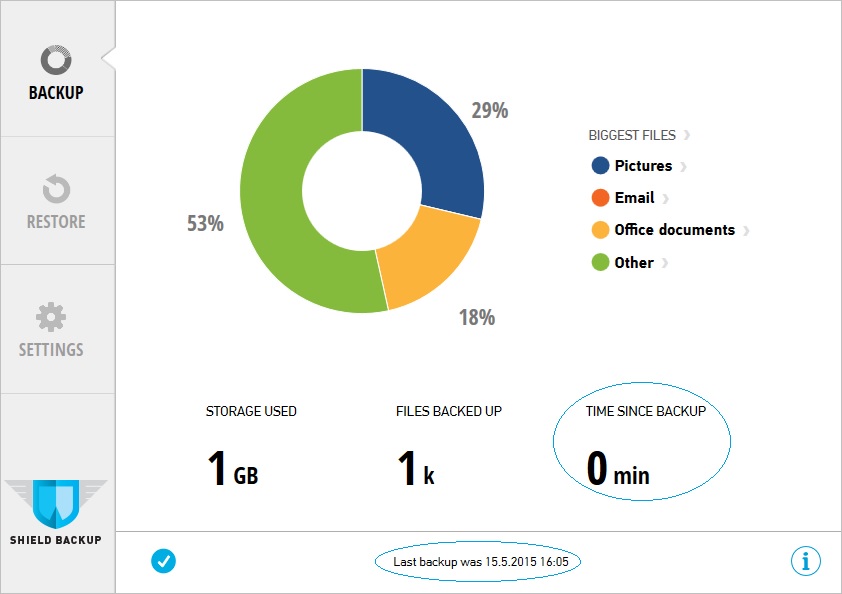
When was the latest backup of my data done?

Heli Siniharju
Updated May 17, 2022 09:21

1) Open the Client application by clicking the Nexetic Icon on Taskbar.

2) You can see date and time for the latest backup at the bottom of the page (circled with blue color in the picture below) 
 

Was this article helpful?
0 out of 0 found this helpful

Articles in this section

  • Which are the most common problems with data restoration?
  • What to do in case of error "Service off"?
  • Where can I download Nexetic Backup for Laptop Application?
  • What kind of license options are available?
  • Where do you store the backup data?
  • Can the system send out alerts via email?
  • Cryptolocker virus has encrypted all my files. What can I do to get the original files back?
  • Which data will be backed up? How can I change the default data selection from Nexetic Backup for Laptop client application?
  • How can I restore data? Can I do it from my laptop?
  • What does the error "UI: OK / Service: No connection to server" mean?
See more

© Nexetic Support